






























































 HR
HR
 SL
SL



How to prepare artwork for print?
Often we receive questions about vector files, rasters and other artwork related questions. Here we will briefly explain the most important things to remember when prividing artwork for printing on promotional products.
Artwork that is properly prepared for printing on promotional gifts has these requirements met:
1. Vector format graphics
2. Colors in CMYK or Pantone standard (depending on printing technique used)
3. Text in outlines
4. PDF format (other formats are possible but not prefered)
-
Detailed explanation of each point:
1. Vector format graphics
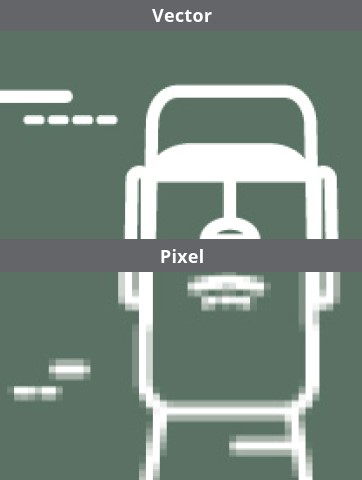
Vector & Raster Graphics
Vector graphics use mathematical equations to define shapes, lines, and curves, allowing for scalable and precise representation. Raster graphics, on the other hand, are composed of individual pixels and are better suited for detailed images like photographs.
Vector Graphics for print
The most important benefit of using vector based artwork is that the files can be enlarged endlessly without any quality loss, also they are very easy to make changes or colour seperations. A vector file can be supplied in the following file formats: EPS, AI, CDR, PDF (PDF is prefered). Any other supplied file types (like JPG, PSD, PNG, BMP) are never vectorised. They are in pixels (raster).
Raster Graphics for print
Raster graphics can be used for print in specific situations and printing techniques. In general, for printing of logo on various promotional products Raster graphics should not be used, vector graphics should be used instead.
When vector graphics are unavailable, high-resolution raster files like JPG, BMP, TIF, or EPS can suffice, but they must have a minimum resolution of 600 dpi to avoid loss of quality. Lower resolution files, such as 72 dpi, are inadequate for printing as they lack sharpness. A 300 dpi file is typically suitable for printing photos or full-color images but may only be printed at its original size or smaller. Enlarging such a file reduces its resolution significantly, rendering it unsuitable for larger prints. For example, a 300 DPI file meant for a 3 cm x 0.7 cm print on a pen would become just 45 DPI if enlarged to 20 cm width on an umbrella.
 |
2. Colors in CMYK or Pantone standard
For detailed info on color standards please visit this page on our website.
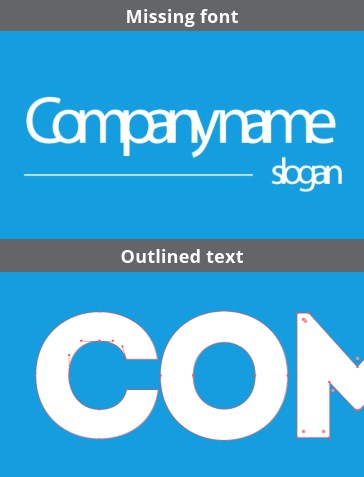
3. Text in outlines
When a text in, with, or instead of a logo has not been put in outlines and the used font type is not available at the printers, the text is being replaced. Often text gets unpurposely placed on top of one another. Sometimes the text even gets replaced by question marks, due to the missing font. The customer can solve this problem by putting the text in outlines (= vectorising).
 |
4. PDF format
This format is standard when creating design, logos, etc. for printing.
Please note that saving .jpg, .bmp, .svg and other image files into .pdf format will not convert them into proper format for printing.